




In 2026, the landscape of streaming content continues to evolve, making it increasingly important to know how your location impacts what you can watch. This guide will help you navigate the complexities of regions and countries and how they affect your streaming library.
- Changing Your Netflix Region
- Why Change Your Netflix Region?
- Methods to Change Your Netflix Region
- Using a VPN to Change Your Netflix Region
- Regions and Countries in Netflix
- What is a Streaming Region?
- How Countries Affect Content Availability
- Impact of Region on Your Streaming Library
- How to Choose the Best VPN for Streaming
- Content Availability by Region
- Device Compatibility and Streaming
Changing Your Netflix Region
Why Change Your Netflix Region?
There are several compelling reasons why you might want to change your Netflix region. The primary motivation is often to access content that is not available in your current country. Due to strict licensing agreements, a TV show or movie available in the UK, for instance, might be entirely absent from the content library of a different country. By changing your Netflix region, you can unlock a vast array of new titles and expand your streaming options, allowing you to stream content from various content libraries globally.
Methods to Change Your Netflix Region
To change your Netflix region, several methods exist, though some are more effective and reliable than others.
The most common and recommended approach involves using a Virtual Private Network (VPN). Other less secure or often ineffective options include Smart DNS services or proxy servers. The goal of these methods is to mask your actual IP address and make it appear as though you are connecting from a different country, thereby altering the content library you can access.
Using a VPN to Change Your Netflix Region
The most robust and popular method for changing your Netflix region is by using a VPN. A VPN works by encrypting your internet connection and routing it through a server in a different country. When you connect to a server in, for example, the UK, your IP address will reflect that UK location, allowing you to access the UK Netflix content library. This enables you to stream content that was previously unavailable in your specific country, effectively bypassing geo-restrictions. Using a VPN to change your Netflix region is a highly effective way to unlock more content.
Regions and Countries in Netflix

The concept of a streaming region is fundamental to how platforms like Netflix deliver content. It essentially defines a geographical area where specific content is legally available. These regions are not always aligned with political country borders, but they heavily influence the selection of TV shows and movies you can access. To illustrate, changing your Netflix region means altering the content library presented to you.
What is a Streaming Region?
A streaming region is a designated geographical area that dictates the availability of specific content on streaming platforms. It’s not just about a country, but often a cluster of countries or even a unique zone with distinct licensing agreements. This means that a particular title might be available in the UK region but not in a different country’s region, influencing what you’re watching and what titles you can stream.
How Countries Affect Content Availability
The country you are in significantly affects content availability due to intricate licensing agreements between streaming services and content creators. These agreements are often location-specific, meaning a TV show or movie might be licensed for distribution in one country’s content library but not another. This is why you might want to access content from a different country, necessitating methods to change your region and unlock a different content library.
Impact of Region on Your Streaming Library
The region you are currently accessing content from directly shapes your streaming library. If you are physically located in a certain country, your IP address will automatically connect you to that specific region’s server, determining the list of available titles. This means that if you want to access content that is only available in, for example, the UK, you would need to change your Netflix region to gain access to that specific content library.
How to Choose the Best VPN for Streaming
Choosing the best VPN for streaming involves several key considerations. When making your selection, you should look for:
- A large network of servers across many countries, allowing you to switch regions easily and access content from various content libraries.
- Fast connections, as speed is paramount for streaming.
- Compatibility with your devices, such as your Fire TV Stick or Apple TV.
Common Questions About VPNs for Streaming
Many users have questions regarding VPNs for streaming, particularly concerning legality and Netflix’s policies. While using a VPN to change your Netflix region is generally legal, it often violates Netflix’s terms of service. Netflix actively tries to block VPN usage, which is why some VPNs work better than others. It’s important to choose a reliable VPN or proxy that can consistently bypass these blocks. You might also wonder about the impact on video quality or how to switch between different country content libraries; a good VPN will minimize quality loss and make changing your server location straightforward.
Content Availability by Region
How Content Varies by Region
Content availability varies significantly by region primarily due to complex licensing agreements. A specific TV show or movie, for instance, might be licensed for distribution in the UK content library but not in a different country’s, meaning you cannot stream that title elsewhere. This directly influences what you’re watching, making changing your Netflix region a common goal for users who want to access a broader range of content from other content libraries. The service has to adhere to these regional agreements, which is why your IP address dictates your accessible library.
Language Options and Accessibility
Language options and accessibility are also highly dependent on the specific region. While many global titles offer multiple language tracks and subtitles, the depth of these options often varies by content library. If you want to access content with specific language dubs or subtitles that are not available in your current country, changing your Netflix region can be a viable solution. Using a VPN to change your Netflix region allows you to connect to a server in a region where your desired language options are prevalent, making the specific TV show or movie more accessible.
Device Compatibility and Streaming
Devices Supported for Region Change
When considering changing your Netflix region, it’s crucial to understand which devices are supported for this process. Most major streaming devices can be configured to use a VPN or proxy service, including:
- Smart TVs
- Laptops
- Smartphones
- Tablets
Devices like the Fire TV Stick and Apple TV are particularly popular for this purpose, as they often have native VPN apps or can be set up through a router. Learning how to change your Netflix region using a VPN on your specific device is key to unlocking new content libraries and expanding what you can stream.
Setting Up Your Device for Region Changes
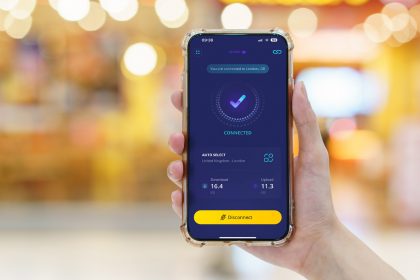
Setting up your device for region changes typically involves downloading and installing a VPN application. Once you’ve chosen a reliable VPN service, you’ll install its app on your device. For instance, if you want to access content in the UK, you would connect to a server located there. This changes your IP address, making it appear as though you are in that country, thus granting you access to its specific content library. This straightforward process makes it possible to stream a different country’s TV show or movie that was previously unavailable.
Troubleshooting Common Issues
Troubleshooting common issues when changing your Netflix region using a VPN is an important skill. Sometimes, Netflix may detect and block your VPN, preventing you from accessing the desired content library. If this happens, try switching to a different server within your chosen VPN service, or even try another country’s server if you’re flexible with the content. Ensure your VPN client is updated and clear your browser’s cache or your device’s app data. A high-quality paid VPN or proxy is less likely to encounter these blocks, ensuring a smoother experience when you want to access content.